Choosing the right Hospital Management Software (HMS) is one of the most critical decisions for your healthcare facility. A wrong choice can cost lakhs in implementation, lost productivity, and eventually switching to another system. This comprehensive guide will help you make the right decision.
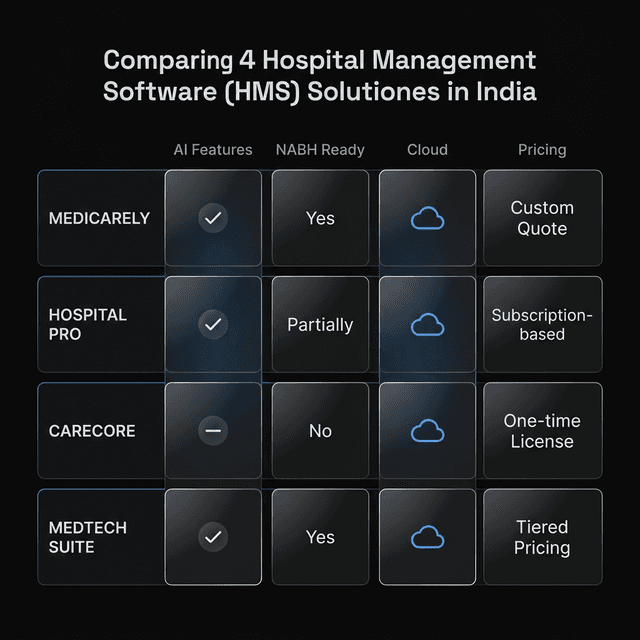
Step 1: Assess Your Hospital's Needs
Before evaluating any vendor, clearly understand what your hospital needs:
70% of HMS implementations fail due to wrong vendor selection.
Hospitals that evaluate 5+ vendors choose a better-fit solution 80% of the time.
Hospital Size
- Number of beds (OPD/IPD)
- Daily patient footfall
- Number of departments
- Staff count
Compliance Needs
- NABH accreditation plans?
- ABDM/ABHA integration?
- State health schemes?
- Insurance TPA panel?
Budget
- One-time vs subscription?
- Implementation budget
- Training costs
- Hardware requirements
Step 2: Essential Features Checklist
Every hospital should ensure these core modules are present:
Must-Have Features (Non-Negotiable)
- OPD Management: Appointments, queue, billing
- IPD Management: Admissions, bed allocation, discharge
- EMR/Patient Records: Digital medical records
- Billing & Invoicing: GST compliant, TPA support
- Pharmacy Management: Inventory, dispensing, alerts
- Lab Integration: At minimum, report viewing
- Reports & Analytics: MIS dashboards
- User Access Control: Role-based permissions
Good-to-Have Features
- AI Medical Scribe (Voice documentation)
- Patient Mobile App
- Telemedicine integration
- WhatsApp notifications
- Multi-location support
- API for integrations
Step 3: Deployment Options
| Factor | Cloud-Based | On-Premise |
|---|---|---|
| Upfront Cost | Low (subscription) | High (one-time) |
| Maintenance | Vendor handles | You handle |
| Data Control | On vendor servers | Full control |
| Scalability | Easy to scale | Hardware limits |
| Internet Dependency | Required | Works offline |
Step 4: Vendor Evaluation Questions
Ask these questions to every vendor during demo:
- How long will implementation take? (Good: 2-4 weeks, Bad: 3+ months)
- What's included in training? (On-site vs remote, duration)
- What's your uptime guarantee? (Look for 99.9%+)
- How is data backed up? (Daily, offsite, recovery time)
- What happens to my data if I leave? (Data export options)
- What's your support response time? (24/7 vs business hours)
- Can I see reference customers? (Talk to existing users)
- What's the total cost of ownership? (Hidden fees, upgrades)
Step 5: Red Flags to Avoid
- No demo available: Always see the software in action
- Unable to provide references: Ask to speak with existing customers
- Extremely low pricing: May lack features or support
- No ABDM roadmap: Will be mandatory soon
- Outdated UI: Staff will resist adoption
- Long-term lock-in contracts: Start with monthly/annual
Step 6: Total Cost Calculation
Calculate the true 3-year cost:
- Software license/subscription
- Implementation and customization
- Training (initial and ongoing)
- Hardware (if on-premise)
- Annual maintenance and support
- Additional modules (future)
- Integration costs (if any)
Our Recommendation
For most hospitals in 2026, we recommend:
- Small clinics (<10 beds): Cloud-based, subscription model, mobile-first
- Medium hospitals (10-100 beds): Cloud with offline capability, NABH features
- Large hospitals (100+ beds): Enterprise cloud or hybrid, multi-location ready
Need Help Choosing?
Get a personalized demo to see if Adrine fits your hospital's needs. No pressure, just honest evaluation.
Get Free Demo